When storing and retrieving data in MS SQL Server, you have two options: Clustered and Nonclustered indexes. A clustered index is your table in a specific order (Think of the old-timey phonebooks). A nonclustered index is typically a smaller subset of fields of the entire table, usually ordered on a different field than your clustered index (Think the index in the back of a textbook). However, both indexes, by default, consist of one record for each row in your table.
“There are known knowns… there are known unknowns… but there are also unknown unknowns—the ones we don’t know we don’t know.”
Donald Rumsfeld, former U.S. Secretary of Defense.
Have you ever written a query like below and it returned zero rows?
SELECT SomethingA, AnotherB, Value
FROM ATable
WHERE Value = NULL
If so, this post is for you! We’ll cover that and a few other gotchas and misconceptions of NULL that new SQL developers may not be aware exist. And even some seasoned developers forget from time to time!
NULL is not an actual value. It’s not like zero (0) or an empty string (”). It’s a state or a marker that signifies nothing actually exists here. It’s akin to unknown, missing, or not applicable.
SQL NULL Gotcha #1: Comparisons in the WHERE Clause (IS NULL)
In a where predicate, NULLs won’t work with operators like “=”, “<>”, or “!=”. This is because you can’t compare something that has a value to something that doesn’t have a value. You can’t even compare two NULL values like this.
Instead, you want to use IS NULL and IS NOT NULL. Back to the original query in this post, this is how you’d write that. Now you’ll get all the records where Value is actually a NULL value.
SELECT SomethingA, AnotherB, Value
FROM ATable
WHERE Value IS NULL
SQL NULL Gotcha #2: Expressions and Concatenation (COALESCE & ISNULL)
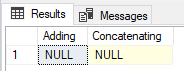
When you add or concatenate a NULL value with a non-NULL value, you get a NULL value. Here is an example of this in action:
DECLARE @a AS INT
DECLARE @b AS INT = 10
DECLARE @c AS VARCHAR(50) = 'Hello'
DECLARE @d AS VARCHAR(50)

SELECT @a + @b Adding,
@c + @d Concatenating
Instead, you should use ISNULL() or COALESCE() to properly handle NULLs in this fashion. ISNULL() evaluates the first parameter to see if it’s NULL, if it is, then it will return the second parameter. However, if the second parameter is also NULL then it will return that NULL value. That’s where COALESCE() comes in handy: It can accept any number of parameters (up to the max allowed parameters). It’ll continue to look at each parameter until it finds a non-NULL value. But if the last one is also NULL, then it’ll return NULL. That’s the power of COALESCE(): it will continue to look at each parameter until it finds the first non-NULL value. Which is why you typically want your last parameter to be something that can’t be NULL.
***NOTE: If you are looking to use an index on a field you are putting inside any function, including these two, you will NOT be able to utilize that index to do seeks.***
Here is the same example above with the correct solution with an example of ISNULL() and COALESCE():
DECLARE @a AS INT
DECLARE @b AS INT = 10
DECLARE @c AS VARCHAR(50) = 'Hello'
DECLARE @d AS VARCHAR(50)

SELECT ISNULL(@a, 0) + @b Adding,
@c + COALESCE(@d, '') Concatenating
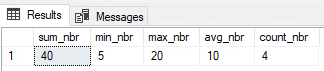
When it comes to built-in system aggregate functions (like SUM(), COUNT(), MIN(), and AVG()), they completely ignore NULL values. This is typically fine for most functions. For instance, when you want to SUM your values you don’t really care about NULL values; same goes MAX. However, for AVG or COUNT, if you have a NULL value you may not get what you expect.
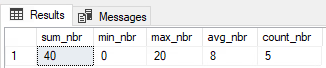
In this code above, we entered 5 values in the table that total 40, but the count is only returning 4. And the average the business is expecting to see is 8 (40 divided by 5 rows), not 10. And finally, most perplexing, they are expecting to see zero (the NULL) as the minimum value, but the query is returning 5. So just like the previous gotcha, we should use a function like ISNULL() to force NULL values to zero if that is how the business wants to treat NULL values.
For COUNT(), you can also use * instead of your NULLable field to get an accurate count for all rows. Whereas we see above putting a NULLable field in the count function will potentially give you counts you don’t necessarily want.
Here is the alternate query showing how the business wants to see the data represented:
And yes, before you mention it, the better approach is to not allow NULLs if the business does not want to include that here. This was just an example of something that could happen in real life, because data is not always clean.
A Note: When Ignoring NULLs is the Correct Choice
However, you don’t ALWAYS want to force some value in for NULL values. There are times you truly want to not include NULL values in any of what we have talked about above. Then in those circumstances, by all means, please let SQL treat NULL like it does by default. There is nothing wrong with this if that is what the query calls for.
Conclusion: Key Takeaways for Handling SQL NULLs
SQL NULLs are one of those tough topics for new developers to get their heads around. It’s like back in math when you tried to learn about imaginary numbers. But don’t worry, even seasoned SQL developers get caught by this one every once in awhile.
Just remember:
NULL is not a true value (like 0 or an empty string), but rather the state of something being unknown.
When testing for something being NULL or not, always use IS NULL or IS NOT NULL.
Arithmetic or concatenation involving a NULL value will always result in a NULL value. Use ISNULL() or COALESCE().
Using aggregate functions (like SUM, AVG, or COUNT) will ignore NULL values.
Which SQL NULL gotcha has tripped you up the most in the past? Add it to the comments below!
Here are 5 official Microsoft docs in case you want to dig deeper on the subject of NULLs:
This is a more advanced (but crucial) topic. It explains the database setting that controls whether = NULL comparisons evaluate to UNKNOWN (the default) or TRUE.
“It is not enough to be busy… The question is: What are we busy about?” – Henry David Thoreau (Poet and Philosopher)
Have you ever had to write a query to check some threshold count of records and then do some action based on that?
For instance, let’s say your reporting website shows a red indicator when you have more than 10,000 orders of a specific category type in the last 30 days. Otherwise, that indicator is green. You don’t care if there is only one more than your limit or one million more.
The Obvious (and Slow) Solution: SELECT COUNT(*)
The obvious first answer is to do a full count of everything that matches that criteria:
SELECT COUNT(*) Cnt
FROM Sales.Orders
WHERE CategoryID = 5
  AND CreateDt >= GETDATE()-30;
Lets say this gives us 156,000 records, which is well above the threshold of 10,000. But look at the cost: it produced 12,080 reads and took 380ms (which you can see using SET STATISTICS IO ON and SET STATISTICS TIME ON). This is on a query that is already using an index and whose stats are up to date.
This query is so slow because it must count every single matching row, even after we have easily counted past our 10,000 record threshold. But how can we short circuit this counting and stop at our threshold?
The Fast Solution: Short-Circuiting with TOP (N)
I’m sure you have all used SELECT TOP (N) at some point to just get a sample of what a table looks like. This same logic can help us short circuit our counting. What if we just asked SQL for the top 10,000 records and then counted that result?
We can do this with an inline subquery:
SELECT COUNT(*) Cnt
FROM (
    SELECT TOP (10000) ID
    FROM Sales.Orders
    WHERE CategoryID = 5
      AND CreateDt >= GETDATE()-30
    ) AS r;
This query now only does 54 reads (0.4% of the original) and completes in 12ms (3% of the original).
It works because the inner query (SELECT TOP (10000)) stops as soon as it finds 10,000 matching records. The outer query then just counts the results of the inner query. If the count is 10,000, we know we have at least that many. If it’s less (for example 8,500), we know we’re under the threshold.
The Takeaway
So don’t forget: if you don’t really care about the total count, but just that it’s above some limit, don’t waste resources and time doing a full COUNT(*). Simply put a short circuit into your query with TOP (N) so it stops counting at your given threshold!
Do you know of any other methods in SQL Server to solve this “at least N rows” problem? Share them in the comments!
Your SQL Server’s tempdb is a critical system resource that does far more than just store temporary tables. It serves as a vital workspace for internal operations like query processing, data spills, index rebuilds, and row versioning. These processes make it a common source of hidden performance bottlenecks. To guarantee optimal performance, it is essential to understand these functions and mitigate contention by configuring and using it correctly.
One of the best parts of the SQL Server community is the abundance of those willing to help others. I don’t know how many times I’ve posted on Slack, Stack Exchange, or other sites asking for assistance and received a prompt well informed reply. There are so many free scripts and tools out there written by some of the best of our brethren that you would be surprised they are giving away for free!








 SQLCwby - Chris Woods