

“There are known knowns… there are known unknowns… but there are also unknown unknowns—the ones we don’t know we don’t know.”
Donald Rumsfeld, former U.S. Secretary of Defense.
Have you ever written a query like below and it returned zero rows?
SELECT SomethingA, AnotherB, Value
FROM ATable
WHERE Value = NULL
If so, this post is for you! We’ll cover that and a few other gotchas and misconceptions of NULL that new SQL developers may not be aware exist. And even some seasoned developers forget from time to time!
NULL is not an actual value. It’s not like zero (0) or an empty string (”). It’s a state or a marker that signifies nothing actually exists here. It’s akin to unknown, missing, or not applicable.
SQL NULL Gotcha #1: Comparisons in the WHERE Clause (IS NULL)
In a where predicate, NULLs won’t work with operators like “=”, “<>”, or “!=”. This is because you can’t compare something that has a value to something that doesn’t have a value. You can’t even compare two NULL values like this.
Instead, you want to use IS NULL and IS NOT NULL. Back to the original query in this post, this is how you’d write that. Now you’ll get all the records where Value is actually a NULL value.
SELECT SomethingA, AnotherB, Value
FROM ATable
WHERE Value IS NULL
SQL NULL Gotcha #2: Expressions and Concatenation (COALESCE & ISNULL)
When you add or concatenate a NULL value with a non-NULL value, you get a NULL value. Here is an example of this in action:
DECLARE @a AS INT
DECLARE @b AS INT = 10
DECLARE @c AS VARCHAR(50) = 'Hello'
DECLARE @d AS VARCHAR(50)

SELECT @a + @b Adding,
@c + @d Concatenating
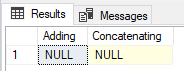
Instead, you should use ISNULL() or COALESCE() to properly handle NULLs in this fashion. ISNULL() evaluates the first parameter to see if it’s NULL, if it is, then it will return the second parameter. However, if the second parameter is also NULL then it will return that NULL value. That’s where COALESCE() comes in handy: It can accept any number of parameters (up to the max allowed parameters). It’ll continue to look at each parameter until it finds a non-NULL value. But if the last one is also NULL, then it’ll return NULL. That’s the power of COALESCE(): it will continue to look at each parameter until it finds the first non-NULL value. Which is why you typically want your last parameter to be something that can’t be NULL.
***NOTE: If you are looking to use an index on a field you are putting inside any function, including these two, you will NOT be able to utilize that index to do seeks.***
Here is the same example above with the correct solution with an example of ISNULL() and COALESCE():
DECLARE @a AS INT
DECLARE @b AS INT = 10
DECLARE @c AS VARCHAR(50) = 'Hello'
DECLARE @d AS VARCHAR(50)

SELECT ISNULL(@a, 0) + @b Adding,
@c + COALESCE(@d, '') Concatenating

SQL NULL Gotcha #3: How Aggregate Functions (SUM, AVG, COUNT, etc) Handle NULLs
When it comes to built-in system aggregate functions (like SUM(), COUNT(), MIN(), and AVG()), they completely ignore NULL values. This is typically fine for most functions. For instance, when you want to SUM your values you don’t really care about NULL values; same goes MAX. However, for AVG or COUNT, if you have a NULL value you may not get what you expect.
CREATE TABLE #temp (nbr INT)

INSERT INTO #temp
VALUES (20), (10), (NULL), (5), (5)

SELECT SUM(nbr) sum_nbr,
       MIN(nbr) min_nbr,
       MAX(nbr) max_nbr,
       AVG(nbr) avg_nbr,
       COUNT(nbr) count_nbr
FROM #temp
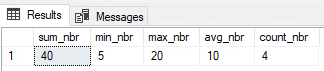
In this code above, we entered 5 values in the table that total 40, but the count is only returning 4. And the average the business is expecting to see is 8 (40 divided by 5 rows), not 10. And finally, most perplexing, they are expecting to see zero (the NULL) as the minimum value, but the query is returning 5. So just like the previous gotcha, we should use a function like ISNULL() to force NULL values to zero if that is how the business wants to treat NULL values.
For COUNT(), you can also use * instead of your NULLable field to get an accurate count for all rows. Whereas we see above putting a NULLable field in the count function will potentially give you counts you don’t necessarily want.
Here is the alternate query showing how the business wants to see the data represented:
CREATE TABLE #temp (nbr INT)

INSERT INTO #temp
VALUES (20), (10), (NULL), (5), (5)

SELECT SUM(ISNULL(nbr, 0)) sum_nbr,
       MIN(ISNULL(nbr, 0)) min_nbr,
       MAX(ISNULL(nbr, 0)) max_nbr,
       AVG(ISNULL(nbr, 0)) avg_nbr,
       COUNT(*) count_nbr
FROM #temp
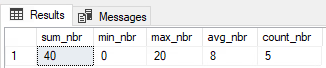
And yes, before you mention it, the better approach is to not allow NULLs if the business does not want to include that here. This was just an example of something that could happen in real life, because data is not always clean.
A Note: When Ignoring NULLs is the Correct Choice
However, you don’t ALWAYS want to force some value in for NULL values. There are times you truly want to not include NULL values in any of what we have talked about above. Then in those circumstances, by all means, please let SQL treat NULL like it does by default. There is nothing wrong with this if that is what the query calls for.
Conclusion: Key Takeaways for Handling SQL NULLs
SQL NULLs are one of those tough topics for new developers to get their heads around. It’s like back in math when you tried to learn about imaginary numbers. But don’t worry, even seasoned SQL developers get caught by this one every once in awhile.
Just remember:
- NULL is not a true value (like 0 or an empty string), but rather the state of something being unknown.
- When testing for something being NULL or not, always use
IS NULLorIS NOT NULL. - Arithmetic or concatenation involving a NULL value will always result in a NULL value. Use
ISNULL()orCOALESCE(). - Using aggregate functions (like
SUM,AVG, orCOUNT) will ignore NULL values.
Which SQL NULL gotcha has tripped you up the most in the past? Add it to the comments below!
Here are 5 official Microsoft docs in case you want to dig deeper on the subject of NULLs:
- NULL and UNKNOWN (Transact-SQL)
- This is the foundational document explaining the three-valued logic (TRUE, FALSE, UNKNOWN) that
NULLintroduces.
- This is the foundational document explaining the three-valued logic (TRUE, FALSE, UNKNOWN) that
- ISNULL (Transact-SQL)
- The official syntax and examples for the
ISNULLfunction you mentioned.
- The official syntax and examples for the
- COALESCE (Transact-SQL)
- The official documentation for
COALESCE, which also includes a good section comparing it directly toISNULL.
- The official documentation for
- Aggregate Functions (Transact-SQL)
- This page confirms your point: “Except for
COUNT(*), aggregate functions ignore null values.”
- This page confirms your point: “Except for
- SET ANSI_NULLS (Transact-SQL)
- This is a more advanced (but crucial) topic. It explains the database setting that controls whether
= NULLcomparisons evaluate toUNKNOWN(the default) orTRUE.
- This is a more advanced (but crucial) topic. It explains the database setting that controls whether
 SQLCwby - Chris Woods