

Category Archives: Fundamentals

Handling the “Unknown”: 3 Ways SQL NULL Will Break Your Query

“There are known knowns… there are known unknowns… but there are also unknown unknowns—the ones we don’t know we don’t know.”

Donald Rumsfeld, former U.S. Secretary of Defense.

Have you ever written a query like below and it returned zero rows?

SELECT SomethingA, AnotherB, Value
FROM ATable
WHERE Value = NULL

If so, this post is for you! We’ll cover that and a few other gotchas and misconceptions of NULL that new SQL developers may not be aware exist. And even some seasoned developers forget from time to time!

NULL is not an actual value. It’s not like zero (0) or an empty string (”). It’s a state or a marker that signifies nothing actually exists here. It’s akin to unknown, missing, or not applicable.

SQL NULL Gotcha #1: Comparisons in the WHERE Clause (IS NULL)

In a where predicate, NULLs won’t work with operators like “=”, “<>”, or “!=”. This is because you can’t compare something that has a value to something that doesn’t have a value. You can’t even compare two NULL values like this.

Instead, you want to use IS NULL and IS NOT NULL. Back to the original query in this post, this is how you’d write that. Now you’ll get all the records where Value is actually a NULL value.

SELECT SomethingA, AnotherB, Value
FROM ATable
WHERE Value IS NULL

SQL NULL Gotcha #2: Expressions and Concatenation (COALESCE & ISNULL)

When you add or concatenate a NULL value with a non-NULL value, you get a NULL value. Here is an example of this in action:

DECLARE @a AS INT 
DECLARE @b AS INT = 10
DECLARE @c AS VARCHAR(50) = 'Hello'
DECLARE @d AS VARCHAR(50)

SELECT @a + @b Adding, 
@c + @d Concatenating
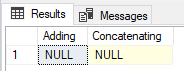
Instead, you should use ISNULL() or COALESCE() to properly handle NULLs in this fashion. ISNULL() evaluates the first parameter to see if it’s NULL, if it is, then it will return the second parameter. However, if the second parameter is also NULL then it will return that NULL value. That’s where COALESCE() comes in handy: It can accept any number of parameters (up to the max allowed parameters). It’ll continue to look at each parameter until it finds a non-NULL value. But if the last one is also NULL, then it’ll return NULL. That’s the power of COALESCE(): it will continue to look at each parameter until it finds the first non-NULL value. Which is why you typically want your last parameter to be something that can’t be NULL.

***NOTE: If you are looking to use an index on a field you are putting inside any function, including these two, you will NOT be able to utilize that index to do seeks.***

Here is the same example above with the correct solution with an example of ISNULL() and COALESCE():

DECLARE @a AS INT 
DECLARE @b AS INT = 10
DECLARE @c AS VARCHAR(50) = 'Hello'
DECLARE @d AS VARCHAR(50)

SELECT ISNULL(@a, 0) + @b Adding, 
@c + COALESCE(@d, '') Concatenating

SQL NULL Gotcha #3: How Aggregate Functions (SUM, AVG, COUNT, etc) Handle NULLs

When it comes to built-in system aggregate functions (like SUM(), COUNT(), MIN(), and AVG()), they completely ignore NULL values. This is typically fine for most functions. For instance, when you want to SUM your values you don’t really care about NULL values; same goes MAX. However, for AVG or COUNT, if you have a NULL value you may not get what you expect.

CREATE TABLE #temp (nbr INT)

INSERT INTO #temp
VALUES (20), (10), (NULL), (5), (5)

SELECT SUM(nbr) sum_nbr, 
       MIN(nbr) min_nbr, 
       MAX(nbr) max_nbr, 
       AVG(nbr) avg_nbr, 
       COUNT(nbr) count_nbr
FROM #temp
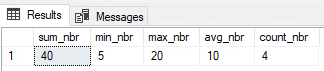
In this code above, we entered 5 values in the table that total 40, but the count is only returning 4. And the average the business is expecting to see is 8 (40 divided by 5 rows), not 10. And finally, most perplexing, they are expecting to see zero (the NULL) as the minimum value, but the query is returning 5. So just like the previous gotcha, we should use a function like ISNULL() to force NULL values to zero if that is how the business wants to treat NULL values.

For COUNT(), you can also use * instead of your NULLable field to get an accurate count for all rows. Whereas we see above putting a NULLable field in the count function will potentially give you counts you don’t necessarily want.

Here is the alternate query showing how the business wants to see the data represented:

CREATE TABLE #temp (nbr INT)

INSERT INTO #temp
VALUES (20), (10), (NULL), (5), (5)

SELECT SUM(ISNULL(nbr, 0)) sum_nbr, 
       MIN(ISNULL(nbr, 0)) min_nbr, 
       MAX(ISNULL(nbr, 0)) max_nbr, 
       AVG(ISNULL(nbr, 0)) avg_nbr, 
       COUNT(*) count_nbr
FROM #temp
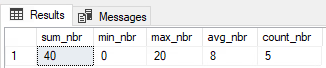
And yes, before you mention it, the better approach is to not allow NULLs if the business does not want to include that here. This was just an example of something that could happen in real life, because data is not always clean.

A Note: When Ignoring NULLs is the Correct Choice

However, you don’t ALWAYS want to force some value in for NULL values. There are times you truly want to not include NULL values in any of what we have talked about above. Then in those circumstances, by all means, please let SQL treat NULL like it does by default. There is nothing wrong with this if that is what the query calls for.

Conclusion: Key Takeaways for Handling SQL NULLs

SQL NULLs are one of those tough topics for new developers to get their heads around. It’s like back in math when you tried to learn about imaginary numbers. But don’t worry, even seasoned SQL developers get caught by this one every once in awhile.

Just remember:

  • NULL is not a true value (like 0 or an empty string), but rather the state of something being unknown.
  • When testing for something being NULL or not, always use IS NULL or IS NOT NULL.
  • Arithmetic or concatenation involving a NULL value will always result in a NULL value. Use ISNULL() or COALESCE().
  • Using aggregate functions (like SUM, AVG, or COUNT) will ignore NULL values.

Which SQL NULL gotcha has tripped you up the most in the past? Add it to the comments below!


Here are 5 official Microsoft docs in case you want to dig deeper on the subject of NULLs:

  1. NULL and UNKNOWN (Transact-SQL)
    • This is the foundational document explaining the three-valued logic (TRUE, FALSE, UNKNOWN) that NULL introduces.
  2. ISNULL (Transact-SQL)
    • The official syntax and examples for the ISNULL function you mentioned.
  3. COALESCE (Transact-SQL)
    • The official documentation for COALESCE, which also includes a good section comparing it directly to ISNULL.
  4. Aggregate Functions (Transact-SQL)
    • This page confirms your point: “Except for COUNT(*), aggregate functions ignore null values.”
  5. SET ANSI_NULLS (Transact-SQL)
    • This is a more advanced (but crucial) topic. It explains the database setting that controls whether = NULL comparisons evaluate to UNKNOWN (the default) or TRUE.

Why Did My PowerShell Object Change? The “Assignment by Reference” Trap

 “It ain’t what you don’t know that gets you into trouble. It’s what you know for sure that just ain’t so.“

Mark Twain

I just ran into this problem and beat my head against the keyboard, wall, and any other solid surface I could find for about an hour until I finally figured out the problem. Hopefully, this post will remind me how to fix this next time I run into this issue. Or perhaps it will help avoid this same issue in the future. Or (gasp!) you are currently facing this issue and need help to solve it.

Overview

  • I wanted to create a process where I get some value in a variable.
  • Along the way I make some changes to that variable.
  • At the end I want to compare the original value of that variable to the final value.

From a TSQL perspective, this is super easy! Just create a second variable and give that second variable the value of the original variable at the beginning before any changes are made to the original. Then at the end compare the values of the two variables to see what changed. Unfortunately, this is not done the same way in powershell when dealing with certain types of variables.

Demo time!

I created a variable and gave it some values:

# 1. Create our "original" object
$originalObject = [PSCustomObject]@{
    Name   = 'ServerA'
    Status = 'Online'
}
$originalObject | Format-List

Which gave the following results:

Name   : ServerA
Status : Online

Now I want to put the value of this “original” object into a new variable so I can have a copy of what the value was originally before I make some changes to the “original” object.

# 2. Create our "snapshot" by just assigning the variable
$snapshot = $originalObject

Next, let’s go ahead and edit the “original” object with a new value.

# 3. Now, let's modify the original object
$originalObject.Status = 'Offline'

Finally, let’s look at the value of both the “original” object and the snapshot object:

# 4. Finally, let's look at both variables
$originalObject | Format-List
$snapshot | Format-List

They are the same?!?!?! How can that be? I literally struggled for an hour trying to figure out what was wrong, thinking something in my code was changing the snapshot inadvertantly.

Name   : ServerA
Status : Offline

Name   : ServerA
Status : Offline

Why Did My Copied Object Change? (The Problem and the Fix)

In Powershell, when you have a custom powershell object and execute $variableA = $variableB, it is just a pointer/link to the same spot in RAM. You are not actually putting the data from $variableB into $variableA like you do in TSQL.

This kind of problem will not occur with all variable types in Powershell. For simple “value” variable types like $int, $string, and $boolean when you run $variableA = $variableB it will actually copy the data into the other variable. This is also known as a “shallow copy“.

However, for the more complex “reference” variable types like $array, $hashtable, and [pscustomobject] you will run into the issue described above with my example. This is because these types of variables just hold a pointer to a specific location in memory. When you run $variableA = $variableB, you are just “copying” that pointer within the variable, not the data itself.

Instead, you need to use the .psobject.COPY() method in PowerShell to copy that data from one custom object variable to the other. This is what is known as a “deep copy“.

Demo Part Deux (Correct solution)

To create a true, independent copy (a ‘deep copy’) of a [PSCustomObject], you must use the .psobject.copy() method.

Just like before I created a variable and gave it some values:

# 1. Create our "original" object
$originalObject = [PSCustomObject]@{
    Name   = 'ServerA'
    Status = 'Online'
}
$originalObject | Format-List

Which gave the following results:

Name   : ServerA
Status : Online

This time however, when I created the snapshot, I used the .psobject.COPY() psobject method in powershell to actually copy the data from one variable to the other.

# 2. Create our "snapshot" by just assigning the variable
$snapshot = $originalObject.psobject.copy()

Next, lets go ahead and edit the “original” object with a new value.

# 3. Now, let's modify the original object
$originalObject.Status = 'Offline'

Finally, lets take a look at the value of both the “original” object and the snapshot object:

# 4. Finally, let's look at both variables
$originalObject | Format-List
$snapshot | Format-List

This time I see the original value as well as the updated value! And the world rejoiced and there was much celebration.

Name   : ServerA
Status : Offline

Name   : ServerA
Status : Online

Conclusion

So the big take away here is not all programming languages are created equal. Go back to the basics if something isn’t working correctly as you expect. Most likely there is something simple and you don’t realize how something actually works.

As an aside, you can just use .copy alone without the .psobject part if you are just dealing with data tables from sql. Oddly enough I’ve been working in PowerShell now for 3 years at least and have never ran into this issue before. I guess I’ve been lucky!

Do you have any other “gotcha” moments you’ve run into when moving from TSQL to PowerShell? Share them below!


If you’d like to read more about this on the official MS Documentation pages:

PSObject.Copy Method: This is the official documentation for the exact method you’re using as the solution.

PowerShell Types (Value vs. Reference): This document is the best explanation of the why. It directly discusses “value types” and “reference types” and the difference between shallow and deep copies.

about_PSCustomObject: Since your example uses [PSCustomObject], this link is highly relevant for readers who want to know more about them.

about_Assignment_Operators: This explains what the simple equals sign (=) operator does, which is the heart of the “problem” part of your demo.

about_Objects: A good general-purpose link for readers who are new to the idea of objects in PowerShell.

Is SQL Defragmentation Still Relevant Today?

Most DBAs have heard the term fragmentation. But do you really know what it means? Do you know there are two types of fragmentation? And in today’s world is it still an issue?

External Fragmentation

SQL stores data in what are called pages. Each page is 8kb in size. Let’s say we have a table for Users that is 100 pages in size. This table has a clustered index on lastname. Every page is completely full of all of our users for the application. What happens when a new user named Joe Cool is added into the application? If there is no space for Joe Cool on page 7 of our table, then SQL will divide page 7 into two parts. It will move the second part of that page to a new page 101. It will then insert Joe Cool on page 7.

Imagine this happening for a few thousand more users. Each one potentially causing another page split. In the end, lets say we have 150 pages. Now we have all of our pages out of order — This is what we call External Fragmentation. In the golden days of databases when we had spinning disks this was an huge issue. Those rust buckets read the data much faster when it was sequential. But, now with modern SSD storage this is almost never a problem anymore. Since it random reads the data it can read the data anywhere very quickly.

Internal Fragmentation

However, as you can imagine in our example above, there may be a lot of empty space on those split pages. This depends on how they were filled with the new users. Also, imagine if we needed to drop a bunch of those users out of our system. We would have even more empty space in our table. This is what we call Internal Fragmentation — where there is empty space (gaps) in our pages.

Internal Fragmentation is going to be much more of a problem than what External Fragmentation is. Imagine printing off our list of Users just as it exists in the table on disk. These physical pages you print off will have a lot of wasted white space. This happens where there are gaps from the splits and/or from the deletes. Before SQL can do anything, it needs the data/pages in memory. To get that, it will need to read the data from disk. This process takes more time than it otherwise would because there are more pages. Why? The data is spread across more pages than necessary with lots of empty space. And then even worse: once it’s in memory the entire page is in memory, even the “white space”. As you can now see, this will be a huge waste of not only disk IO but also precious RAM.

The Bad Fix

Many DBAs react to performance complaints on a query by checking External Fragmentation. They often conclude that they need to rebuild their index when they see the high percentage of fragmentation. Once they do the performance is suddenly better and they pat their backs and say, “Job well done!” But what they don’t realize is most likely it wasn’t the actual defragmentation that solved the problem.

When a rebuild occurs three things happen:

  1. The actual rebuild
  2. A full stats update
  3. Clearing any plans from cache that involved that index

Most likely what fixed your issue was #2 or #3.

The Good Fix

So it’s much better to look at and fix those two first:

Full Stats update: Look to see if the the index has out of date stats. If so, then update the stats and check the query again. Stats updates are much less resource intensive than an index rebuild.

Plan Cache clearing: This may have solved your problem because of a bad query plan. Instead, you should check the query plan in cache. See if it makes sense for what you are trying to do. If this was your issue, most likely you have parameter sniffing that you need to look into.

Internal Fragmentation: If neither of the above has solved your problem, then look at Internal Fragmentation. If you find a lot of Internal Fragmentation, then go ahead and rebuild the index. You should check your fill factor. Make sure it’s at the default to decrease the chances of this happening again. (I plan to have a future post about how to adjust fill factor if you believe it needs to be adjusted. So be sure to subscribe so you won’t miss it when it comes out!)

Obviously after this point if you are still having issues, it’s time to dig deeper into the query plan. Examine how you can improve it. Use just good old query tuning techniques.

Have you found other ‘bad fixes’ that DBAs commonly rely on, and what’s your ‘good fix’ alternative?

What is Your tempdb Really Doing? A Guide to Spills, Contention, and Performance

Your SQL Server’s tempdb is a critical system resource that does far more than just store temporary tables. It serves as a vital workspace for internal operations like query processing, data spills, index rebuilds, and row versioning. These processes make it a common source of hidden performance bottlenecks. To guarantee optimal performance, it is essential to understand these functions and mitigate contention by configuring and using it correctly.

Continue reading

Perfection is Overrated: Why Done is Better than Perfect

You may have heard the phrase “Perfection is the enemy of good”. I believe this to be very true, with obvious exceptions.

Continue reading